

For configuring the fee receipts for a specific session please follow the below-mentioned steps.
Step 1- Click on settings.
Step 2- Go to finance.
Step 3- From the list click on Fee.
Step 4- Now from the list find Fee Autonumbering Sequence and enter into it.
Step 5- Click on the plus icon (+).
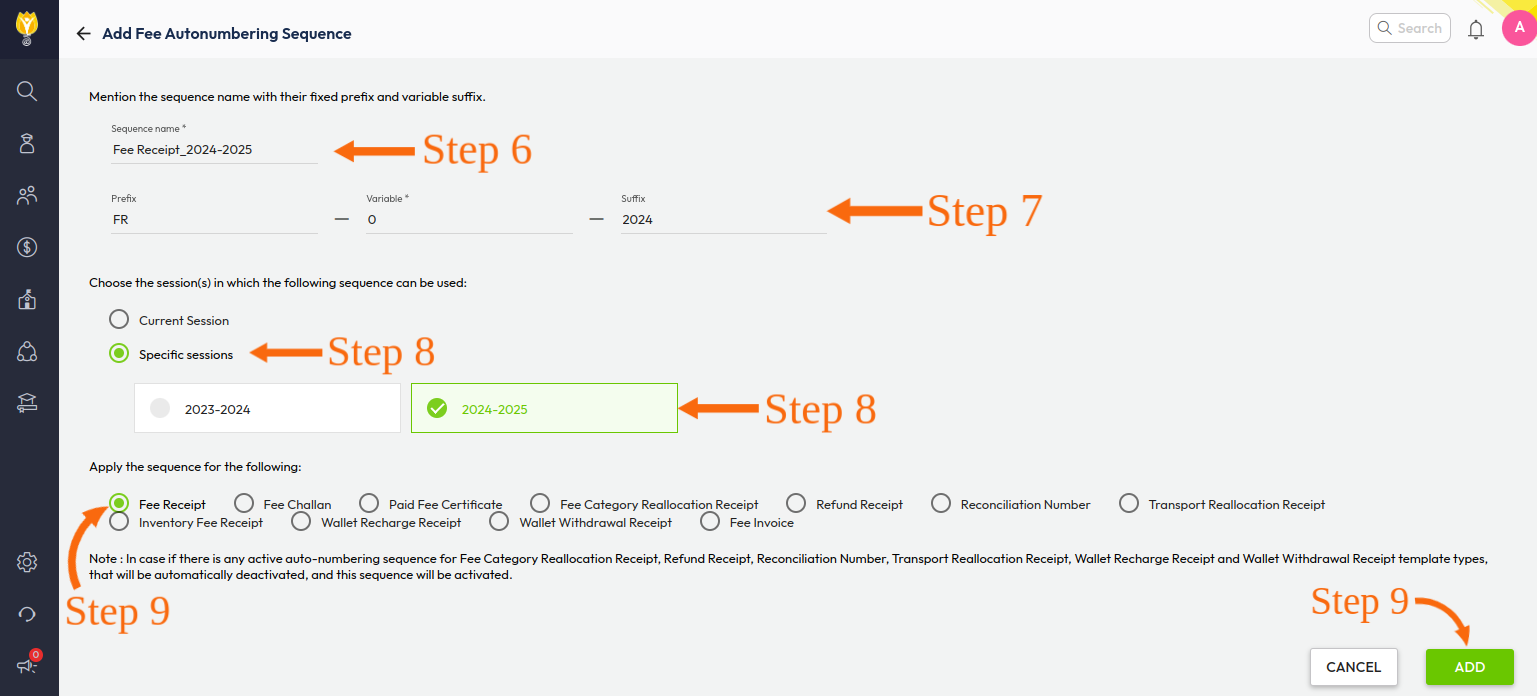
Step 6- Now write the sequence name as per your feasibility like Fee receipt_2024-2025.
Step 7- Now write prefix, variable & suffix according to your feasibility. The variable that you will mention here will start from the next variable, which will start in fee receipt.
For example, if you have mentioned 0 then in the fee receipt it will start from 1.
a) Prefix: A constant part before the variable number, for example: FR (Fee Receipt).
b) Variable: The number that will increment with each new receipt.
c) Suffix: A constant part after the variable number, for example: 2024.
Example:
- Prefix: FR
- Variable: 0
- Suffix: 2024
This will result in the first fee receipt: FR1-2024.
Step 8- Select check-circle against a specific session and select the desired session/sessions.
Step 9- In Sequence select the fee receipt and click on ADD.
In this way, you can configure the fee receipt for a specific session, and for better understanding please check the attached video.