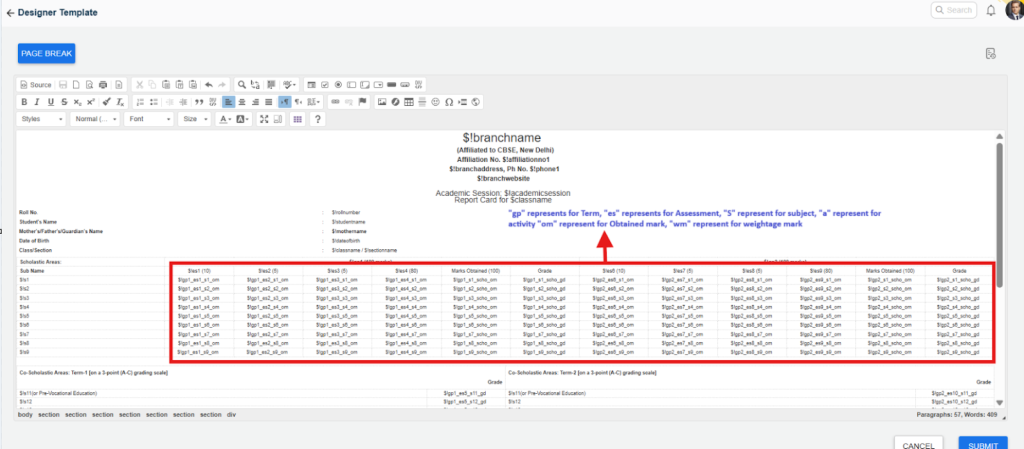
This issue usually occurs due to a sequence number mismatch in the Examination Hierarchy or incorrect coding in the report card template. To resolve it, you must ensure that the sequencing for Terms, Assessments, Subjects, and Activities is correctly maintained and aligned with the report card design.
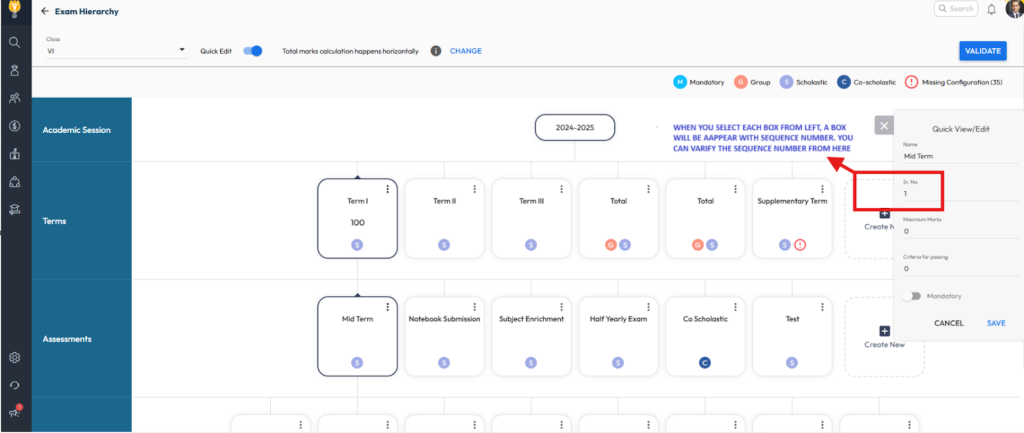
1. Verify and Correct Sequence in Examination Hierarchy
- Navigate to Settings > Student > Examination > Examination Hierarchy.
- Select the required Class and enable Quick Edit.
- Review the sequence numbers for the Term, Assessment, Subject, and Activity.
Correct Sequencing Guidelines:
- Terms:
- Term I → Sequence 1
- Term II → Sequence 2
(Do not assign the same sequence number to multiple terms.)
- Assessments:
Assign continuous sequence numbers across terms:- Assessment 1 → Sequence 1
- Assessment 2 → Sequence 2
- Continue numbering when configuring assessments under Term II from where Term I ends.
- Activities (within each subject):
- Activity 1 → Sequence 1
- Activity 2 → Sequence 2
(This sequence can be repeated for each subject.)
2. Verify Coding in the Report Card Design
⚠️ Important:
Editing a Report Card Template should only be done if you are familiar with the Visual/HTML Editor. Incorrect modifications may break the layout or disrupt data mapping.
- Navigate to Settings > Student > Examination > Report Card Builder.
- Select the report card design and click View.
- Check the coding/keys used in the template and ensure they match the hierarchy sequence.
Code Reference:
- gp → Term
- es → Assessment
- s → Subject
- a → Activity
- om → Obtained Mark
- wm → Weightage Mark
Example: $!gp1_es1_s1_a1_om
This code displays the Obtained Mark for Term 1 > Assessment 1 > Subject 1 > Activity 1, as configured in the Examination Hierarchy.
By ensuring consistent sequencing in both the Exam Hierarchy and Report Card Template, Term I and Term II marks will display correctly without duplication.