

You can generate fee defaulter reports for any academic session by applying the required filters in the Fee Reports section.
Steps to Generate the Report
Steps to Generate the Report
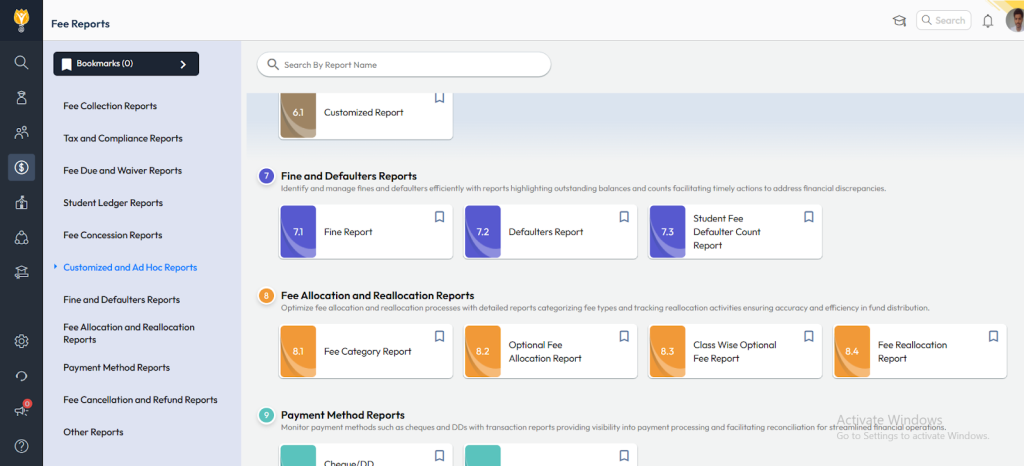
- Navigate to Finance > Fee > Fee Report.
- Select the Fee Defaulter Report (often listed as option 7.2 or similar).
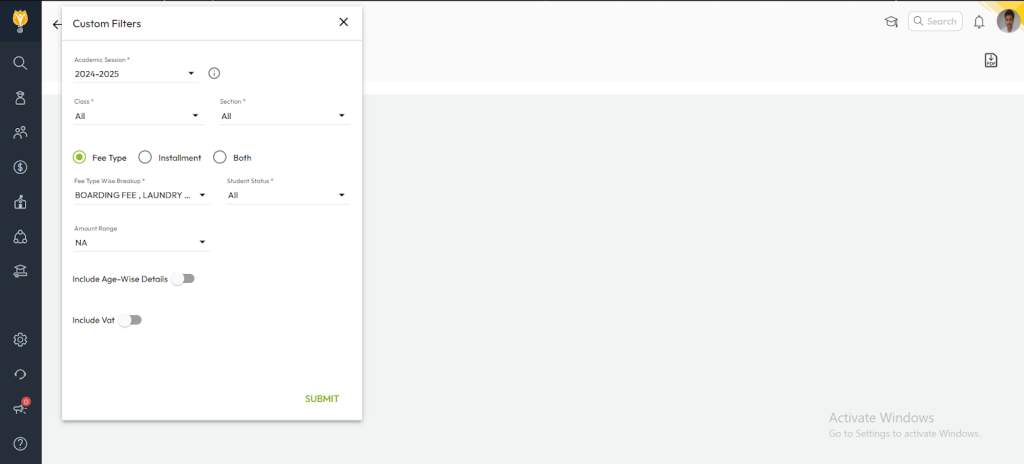
- Apply the required filters:
- Academic Year – choose the session you want to view
- Class – select the class/grade
- Fee Type – choose the relevant fee types (e.g., Tuition, Transport, etc.)
- Click Generate Report to view the defaulters list for the selected session.
Verification
- Review the displayed list to ensure all students with outstanding dues are included.
- Confirm that the pending amounts are accurate and match the outstanding balances.
This method allows schools to track fee defaulters across current or previous academic sessions without switching the entire system session.
Video Tutorial :
Was this article helpful to you?
Yes0
No0