

To configure late fee charges in Next OS, follow these step-by-step instructions:
- Navigate to Settings > Finance > Fee > Fine.
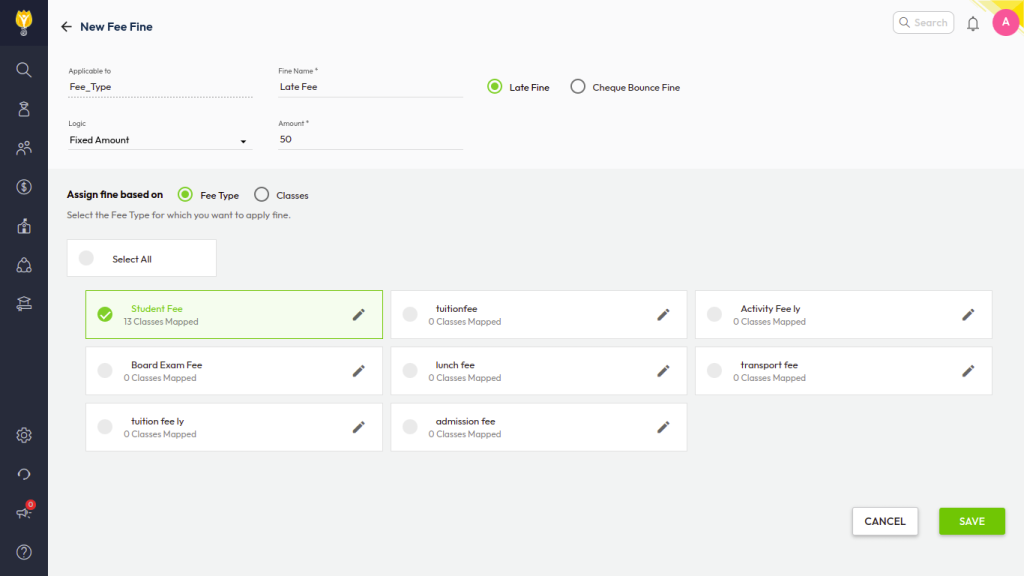
- Click Create New and enter the name of the fine.
- Select the type of fine: Late Fee or Cheque Bounce Fine.
- Choose the logic for calculating the fine from the following options:
- Fixed Amount
- Fixed Percentage
- Day-wise Amount
- Slab Amount
- Slab Percentage
- Select how the fine should be assigned, either by Fee Type or Class.
- Click Save to confirm the changes.
Additional Settings:
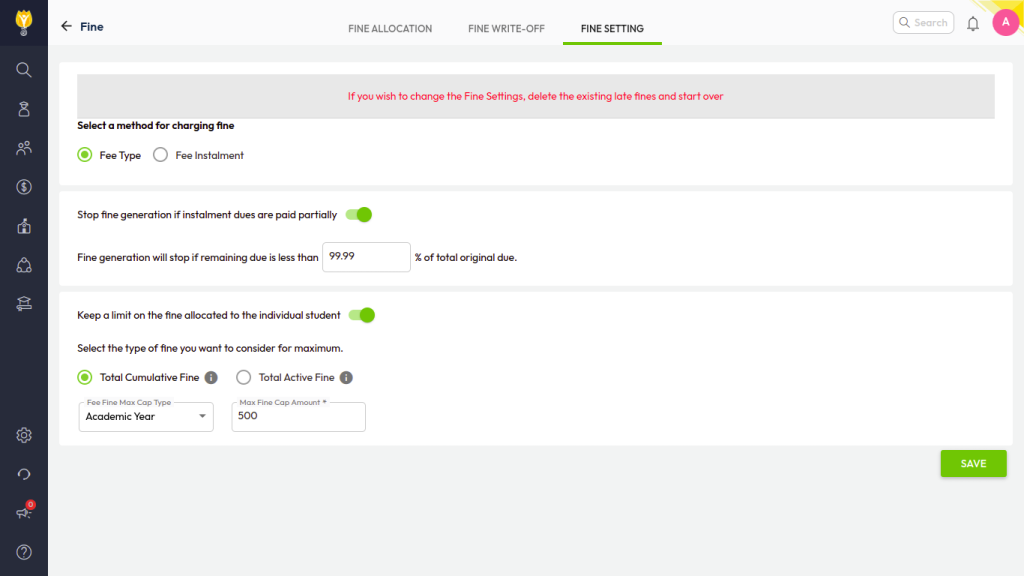
- Enable the option to stop fine generation if installment dues are partially paid.
- Set a limit on the fine allocated to individual students using the Fee Setting tab, available on the same path.
Based on the end due date given in Fee Schedule system will calculate and apply the fine on selected fee type or class.
Was this article helpful to you?
Yes0
No0