

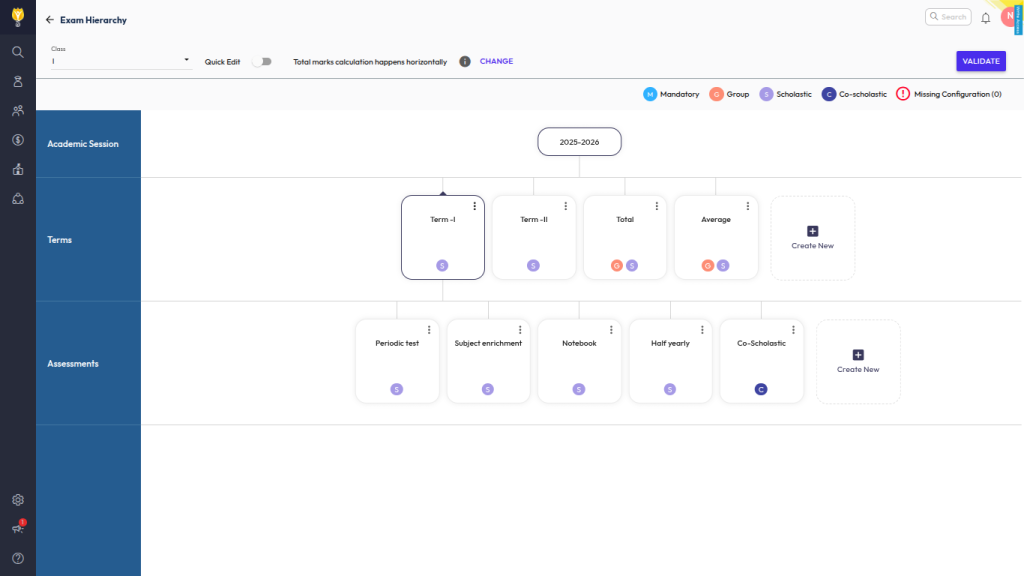
- Navigate to Settings > Student > Student Examination > Exam Hierarchy.
- Select the relevant Class.
- Click on Terms to view the list of assessments.
- Locate the assessment you want to delete.
- Click the three dots (︙) next to the assessment and select Delete.
The selected assessment will be removed from the exam hierarchy.
Note: System won’t allow to delete the assessment In case marks have been entered.
Contact Support Team
In case above process doesn’t help you, please reach out to the NextOS Customer Support team via :
📧 Email: support@nexteducation.in
📞 Toll-free: 1800 200 5566
💬 WhatsApp: 7337554528
Was this article helpful to you?
Yes0
No0