

Video Tutorial :
Enabling parent access allows parents to view and download their child’s report card online for a defined period.
Things to Verify Before Publishing
- Ensure marks entry is completed for all students.
Verify it using Marks Entery Checklist - Preview the report card for a few random students and verify:
Overall design and layout, Alignment and formatting, Correct marks/grades display, Other important details (student info, totals, remarks, etc.) - If anything looks incorrect or incomplete, review the full exam setup.
Navigate to Student > Examination > Exam Setup Guide and follow the step-by-step process given on the page.
Steps to enable the parent access:
- Navigate to Student > Examination > Report Card Publish.
- Choose the required report card from the list.
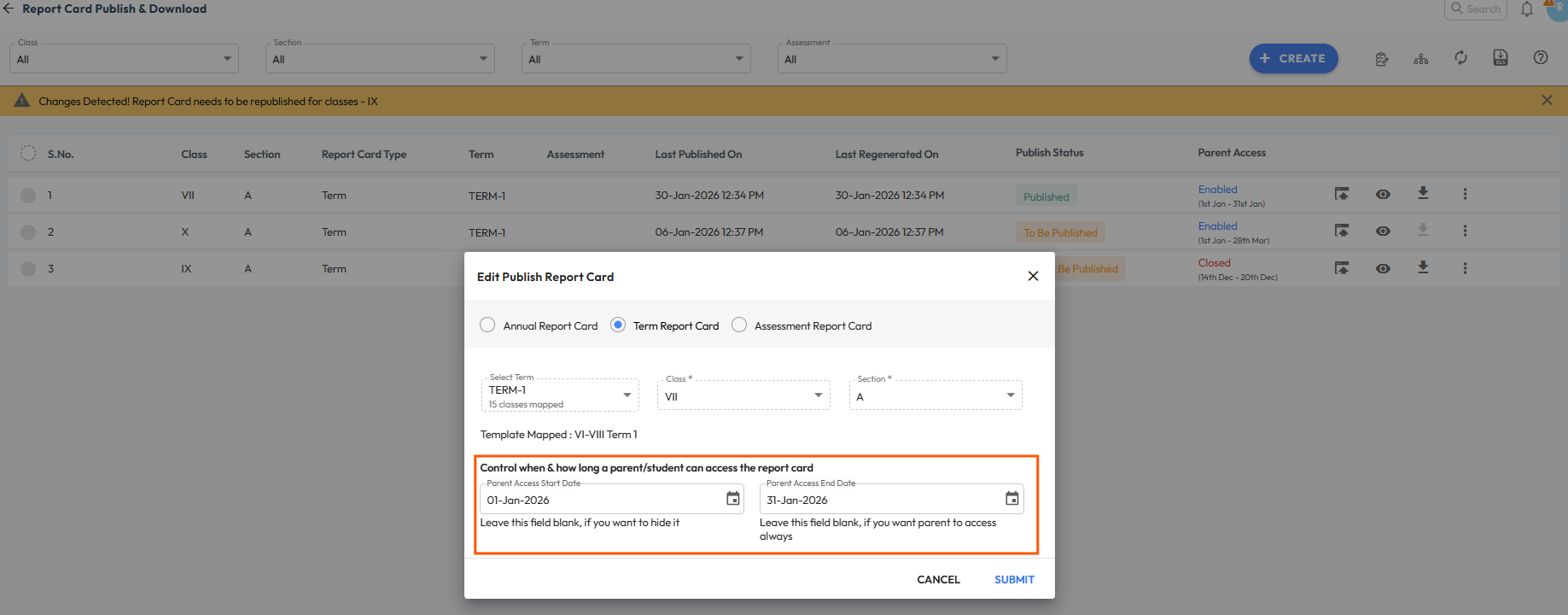
You can also use the available filters to find it quickly. - Click the three dots beside the result, then choose Edit.
You can do this for an already published report card, or set parent access while adding a new one. - Set the Parent Access Dates :
- To Enable Permanent Access : Enter Start date & keep End date blank.
- To Enable Limited Access : Enter Start and End date both.
- Click Submit to save the changes.
Once the parent access dates are saved, the report card becomes visible to parents immediately. Republishing is not required.
Note: Report cards will be visible to parents only if they have been published at least once. - Additionally, you can also see a Parent Access status as :
- Enabled – This shows if the End date is not yet passed, parents can view and download the report card.
- Closed – This shows if End date has passed, parents can no longer view or download the report card.
Note: Report cards will only display to parents if they are published for any single time and Publish Status is showing as Published.
Hide Report Card
In case you want to hide the report card for students with pending fees, refer to the step-by-step guide below.
How can I hide the report card from parents whose fees are pending?
Was this article helpful to you?
Yes0
No1