

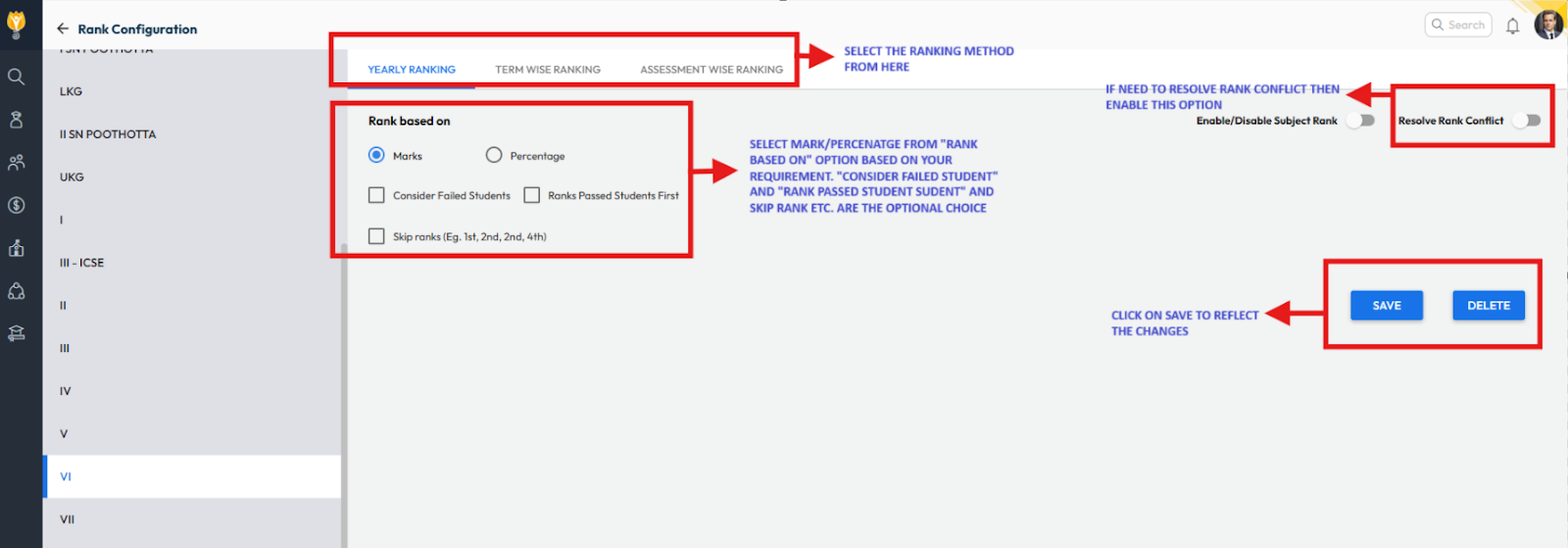
You can set up section-wise ranking using Rank Configuration under Examination Settings. Follow the steps below:
- Navigate to Settings > Student > Examination > Rank Configuration.
- Choose the required ranking type based on your need:
- Yearly
- Term-wise
- Assessment-wise
- Set Rank Based On (Marks or Percentage).
- Click Save to apply the changes.
- Addtional Options
- Consider Failed Students: When enabled, the system will calculate and display ranks for failed students as well.
Note: Ensure that the Pass/Fail Configuration is set up when you enable this option. - Rank Passed Students First: When enabled, the system will prioritize passed students and assign them ranks before failed students.
- Skip Ranks: When enabled, the system will skip the next rank when two or more students share the same rank.
- Consider Failed Students: When enabled, the system will calculate and display ranks for failed students as well.
Tip: To display ranks on the report card, ensure that the appropriate placeholders (rank keys) are added and positioned correctly in the report card template.
Contact Support Team
If the above steps do not solve your purpose, feel free to contact our support team:
📧 Email: support@nexteducation.in
📞 Toll-free: 1800 200 5566
💬 WhatsApp: 7337554528
Was this article helpful to you?
Yes0
No0