

You can verify the delivery status of fee defaulter alerts from the Message Status Report.
Check delivery status
- Navigate to Collaboration > Communication > Communication Report.
- Open Message Status Report.
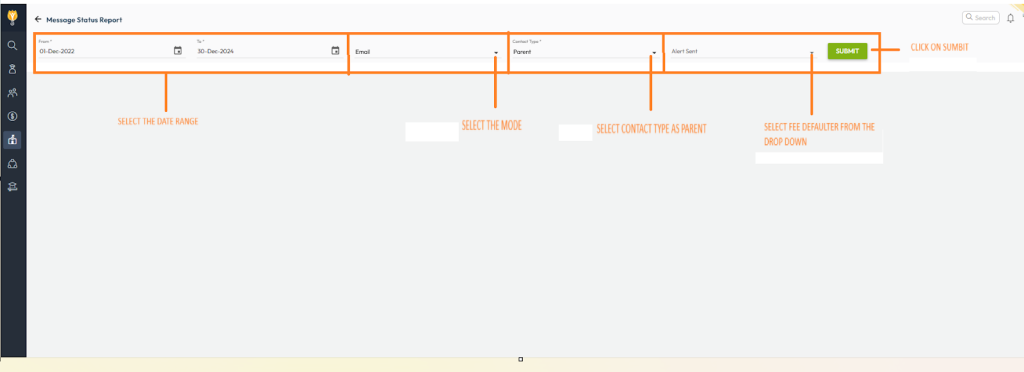
- Apply the required filters:
- Date Range – period to review
- Mode of Communication – Email / SMS / App
- Contact Type – Parent
- Alert Sent – Fee Defaulter Alert
- Click Submit to view the delivery status and timestamps.
If alerts are not working, verify the following
- Alert configuration
- Go to Settings > Collaboration > Communication > Alerts and ensure Fee Defaulter Alert is enabled.
- Alert schedule & time
- Check the configured days before due date and alert trigger time.
- Parent contact details
- Ensure parent email IDs and mobile numbers are valid and updated in student profiles.
- Sender verification
- Confirm the sender email ID is verified; unverified senders can block delivery.
How to get it fixed
You can raise a request to the support team using either of the following methods:
- Log in to NextOS and use Raise a Ticket or Chat with Support from the support section.
- Alternatively, send an email to support@nexteducation.in with the following details:
- School Name
- School URL
- Proplem Summary
The support team will review your request and update you with solution.
Video Tutorial :
Was this article helpful to you?
Yes0
No0