

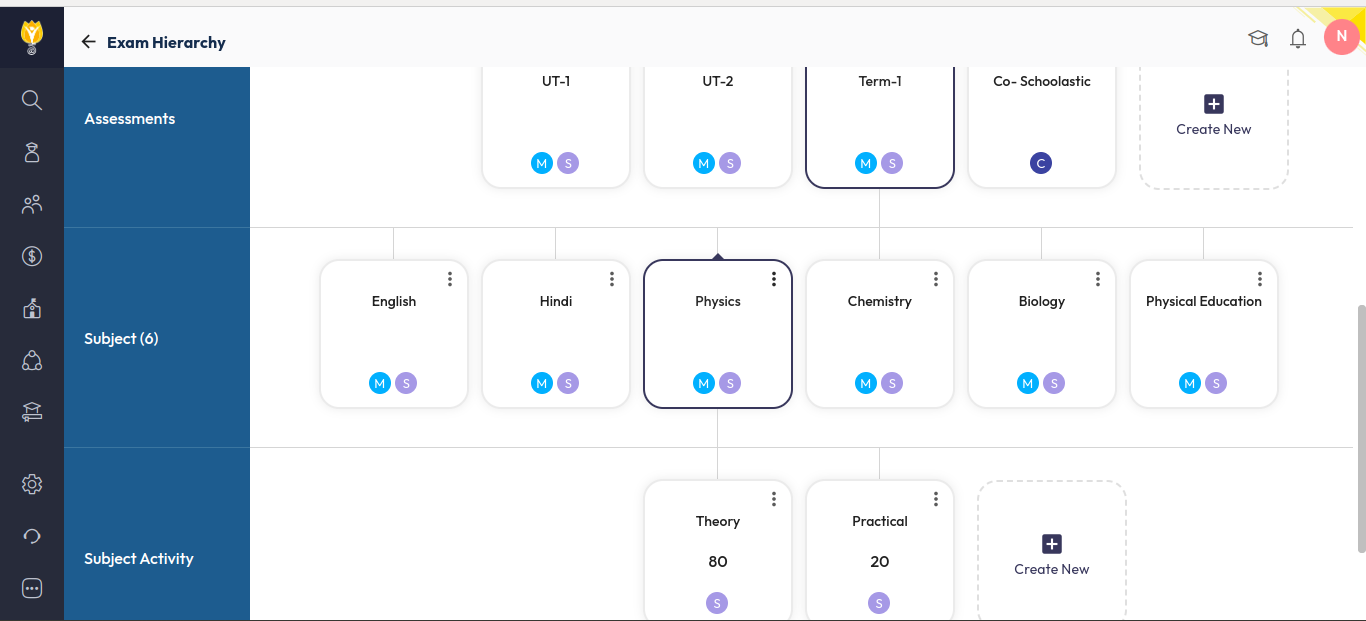
You can distribute marks between Theory and Practical by configuring separate activities for the subject in the Exam Hierarchy.
- Navigate to Settings > Student > Examination > Exam Hierarchy.
- Select the required Class, then choose the Term and Assessment where the split is needed.
- Open the Subject for which you want to divide the marks.
- Add two activities under the subject:
- Theory
- Practical
- Assign the maximum marks for each activity as per the school’s evaluation pattern.
- Save the configuration.
Once this is done, marks can be entered separately for Theory and Practical, and they will be calculated and displayed accordingly in reports and report cards.
Was this article helpful to you?
Yes0
No0