

If the grades displayed do not match the marks, you should first verify the Grade System configuration and then check the grade system mapping in the Examination Hierarchy.
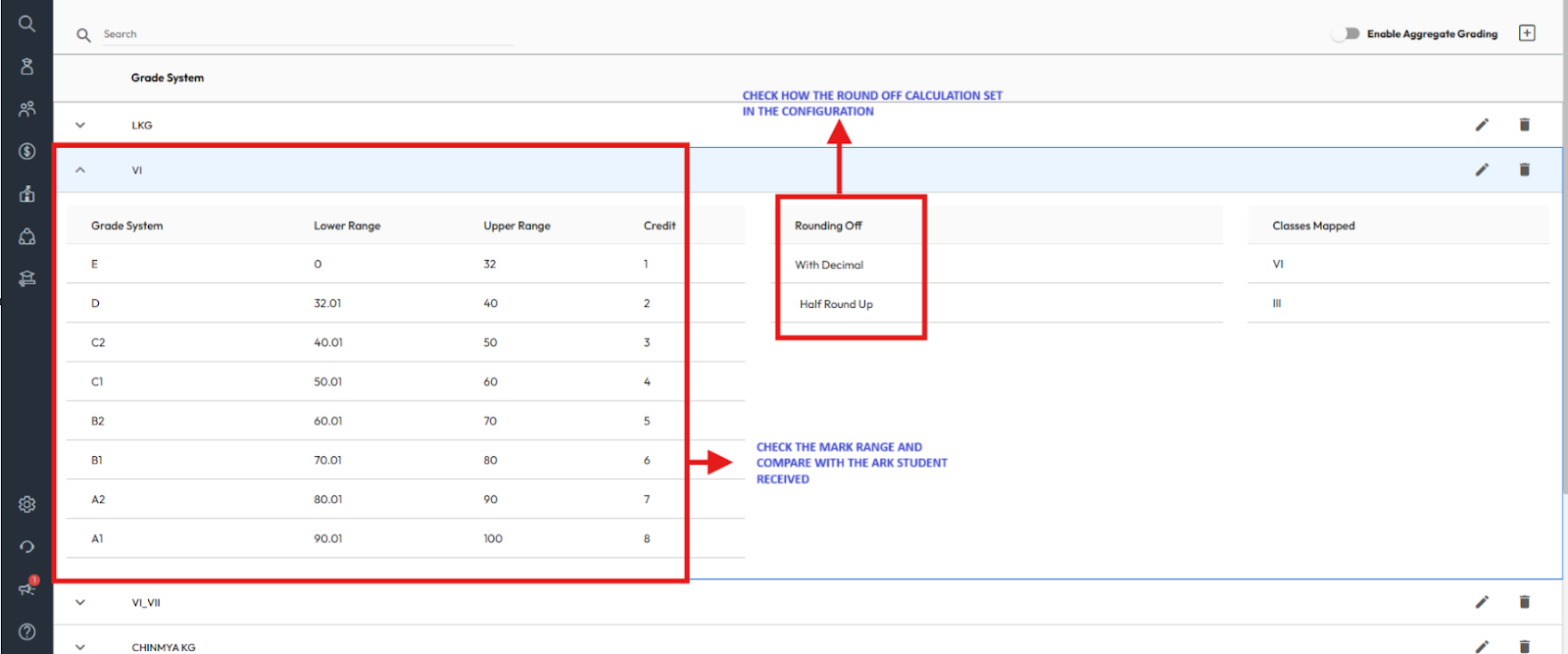
Check Grade System Configuration
- Navigate to Settings > Student > Examination > Grade System.
- Review the configured grading scale and ensure the mark ranges and grade points are correct.
Check Grade Mapping
If the grading scale itself is accurate, the issue may be due to an incorrect grade system mapping in the Examination Hierarchy. Follow these steps to verify and correct it:
- Navigate to Settings > Student > Examination > Examination Hierarchy.
- Select the required Class and click Validate.
- Choose the relevant Term.
- Review the Grade System column at the Assessment, Subject, and Activity levels.
- Check whether the mapped grade system is correct.
- If it is incorrect, select the appropriate grade system from the dropdown.
- Click Save to apply the changes.
Once updated, the correct grade system will be applied and reflected accurately in calculations and report cards.

Was this article helpful to you?
Yes1
No0