

 > Attendance > Student Attendance
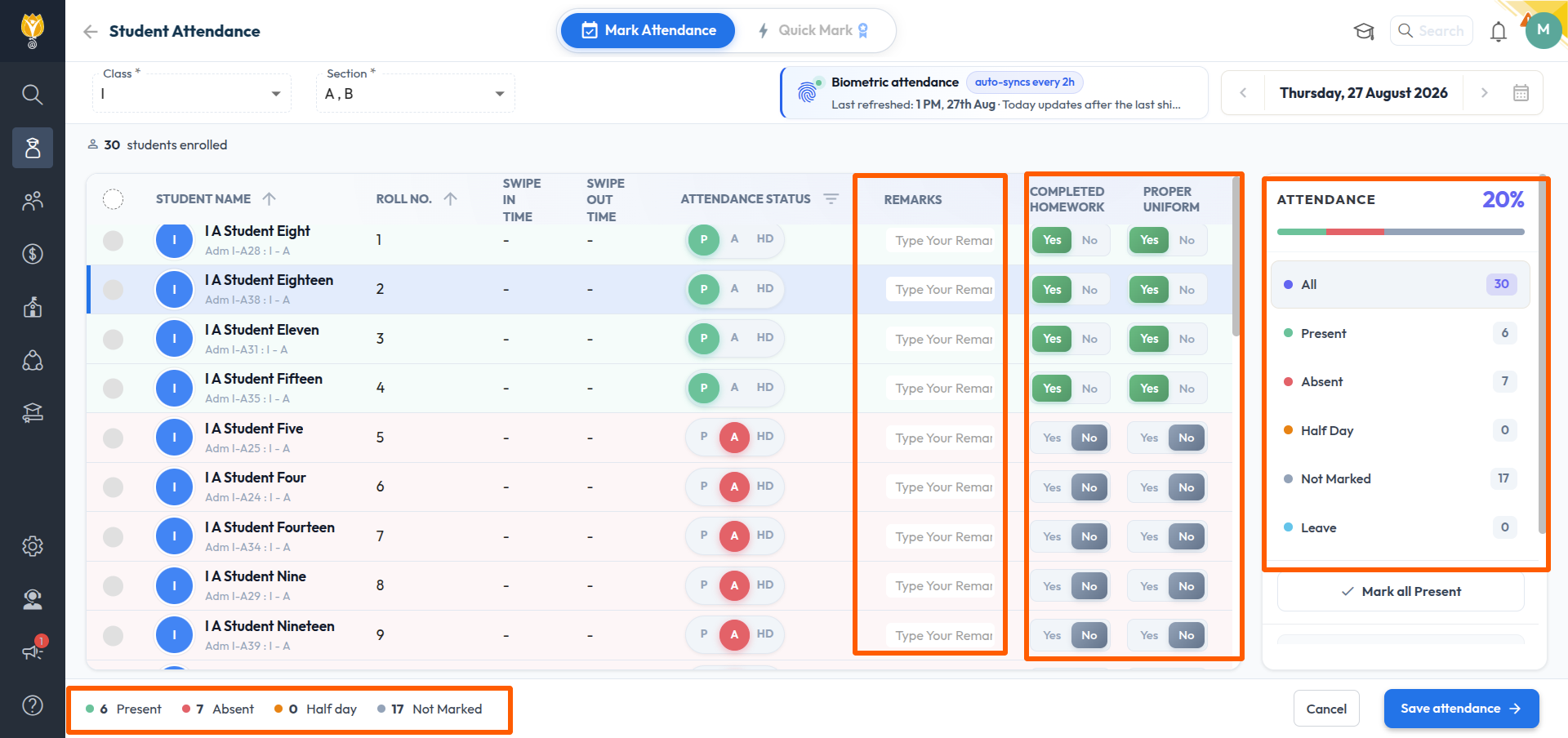
The Mark Attendance page displays the list of students enrolled in the selected class and section, along with the total count of students enrolled.
The list displays the following columns:
- Student Name – name and admission number of the student. Select the arrow beside the column name to sort the list alphabetically.
- Roll No. – roll number of the student. Select the arrow beside the column name to sort the list by roll number.
- Swipe In Time / Swipe Out Time – biometric punch details for the day. A hyphen is displayed if no punch is recorded for the student.
- Attendance Status – status marked for the student. Select the filter icon beside the column name to view only the students of a particular status.
- Remarks – free text that can be entered against a student for that day.
- Completed Homework – select Yes or No.
- Proper Uniform – select Yes or No.
The panel on the right of the page displays the attendance percentage for the day and the number of students marked under each status:
- All
- Present
- Absent
- Half Day
- Not Marked
- Leave
NOTE:
- The counts are updated as the attendance is marked. Check the Not Marked count before saving to confirm that no student has been missed.
- The attendance percentage displayed is for the selected day only.
Was this article helpful to you?
Yes0
No0