

To configure optional fees for a future academic session, new academic session must be created. Follow the steps to define it :
Step 1: Create the New Academic Session
- Navigate to Settings > Administration > School Setup > Academic Session
- Click Create New Session
- Enter the academic year details (e.g., 2026–2027)
- Save the new session
Once created, the session will be available for configuration.
Step 3: Configure Optional Fee Types
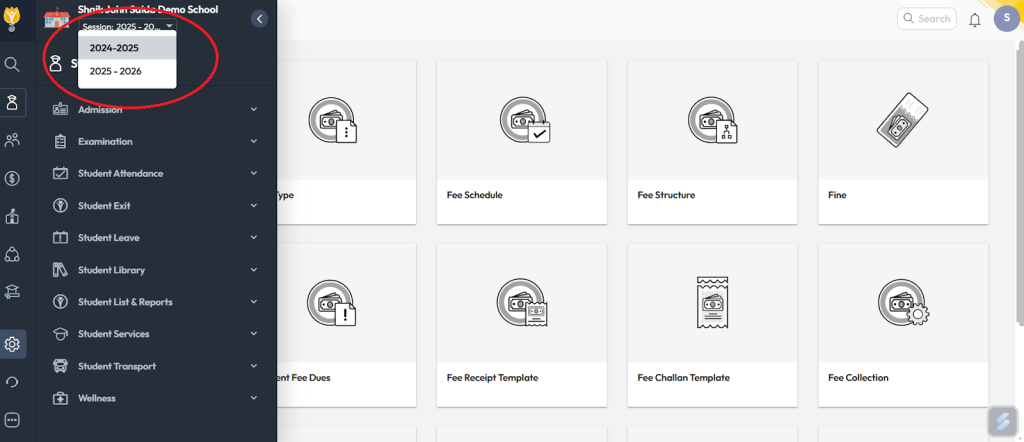
- Firstly switch to the future academic session, using search button from the menu.
- Navigate to Settings > Finance > Fee > Fee Type
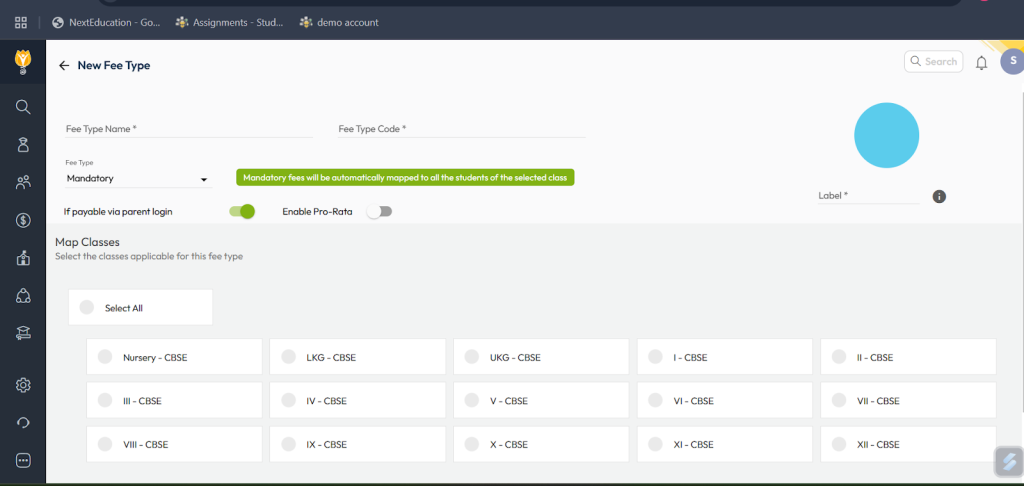
- Click Create New
- Enter the following details:
- Fee Type Name (e.g., Sports Fee, Lab Fee, Hostel Fee)
- Fee Type Code
- Set Fee Type = Optional
- Select the applicable Classes
- Click Save
Video Tutorial :
Was this article helpful to you?
Yes0
No0