

By default, fee due alerts are generated at 4:30 AM IST. This time applies to all installment reminders and is triggered automatically based on the number of days configured before an installment’s due date.
Features and Options:
- Scheduling Reminders:
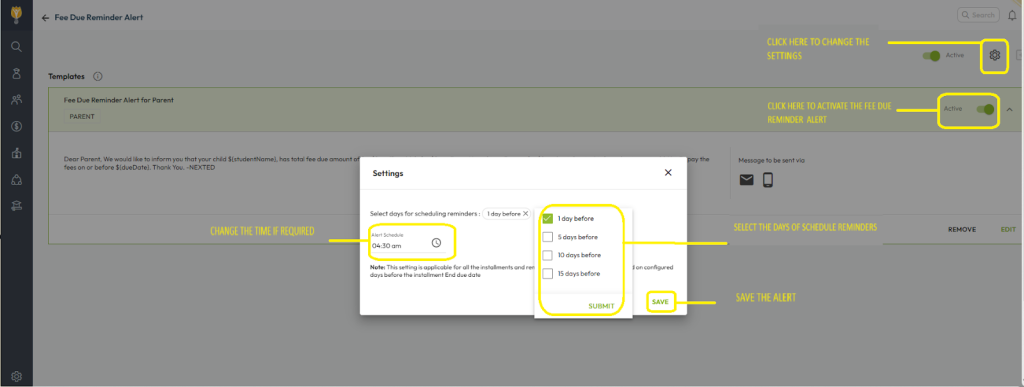
- You can schedule reminders for specific days before the due date (e.g., 1 day, 5 days, 10 days, or 15 days prior).
- The alerts are sent automatically when enabled.
- Enabling/Disabling Alerts:
- The reminder alert can be turned on or off using the toggle button labelled “Fee Due Reminder Alert for Parents.”
- Customizing Alert Time:
- The time of the alert (default 4:30 AM IST) can be modified on the same configuration screen.
Steps to Configure Fee Due Defaulter Alerts:
- Navigate to Settings > Collaboration > Communication > Alerts.
- Search for Fee Due Reminder Alert and click it.
- On the template screen:
- Enable the toggle button to activate the automatic reminder alerts.
- Adjust the scheduling days (e.g., 1 day, 5 days, etc.) to suit your needs.
- Modify the alert time if required.
- Save the configuration.
This setup allows schools to fully control when and how fee due alerts are sent to parents.
Video Tutorial :
Was this article helpful to you?
Yes0
No0